Monday, January 11, 2010

Energy2D: Interactive computational fluid dynamics

Computational fluid dynamics (CFD) uses numeric methods to study any natural phenomenon and solve any engineering problem related to fluid flow. It has been an indispensable tool for many engineers. Mature, powerful CFD products are available nowadays. While these products are very useful tools for engineers, they were not designed for kids to play with. Understandably, the business community lacks the financial incentive to push the agenda of making a product friendly to students for learning science and engineering. With all these years passed while CFD products got better and better, all the wisdom developed for modeling and understanding the natural and man-made systems never got spread to schools in a satisfactory scale.

This tragedy was, in part, caused by the unfortunate fact that few people in the education community had realized the enormous power of CFD for teaching science and engineering. Educators had a very good reason for not seeing it, because the power has never been brought close enough to matter in their professional careers. Most CFD tools are either too complicated to use or do not deliver the needed visual effects and user interfaces to matter. This is an issue that cannot be simply said solved by sending a demonstrator from the CFD community to the education community. Talking and showing are cheap. To bridge the gap, we need actions that will truly make a difference.

Supported by the National Science Foundation with an urgent need for educating young students with energy science and technology, we are developing a versatile CFD package suitable for teaching the scientific and engineering principles related to energy flow, particularly about energy-efficient passive solar buildings. The package consists of two programs called Energy2D and Energy3D, respectively, for the 2D and 3D versions of the CFD simulator.

Energy2D and Energy3D are based on solving the heat equation for modeling thermal conduction, coupled with the Navier-Stokes equation for modeling convection. A ray-tracing method is used to model radiation. The minimum requirement is that the simulation must run fast enough to be interactive so that students can play with it.

After a few weeks of work, I came up with a primitive version of Energy2D. The following two screenshots show that if the obstacle has a small cross section against the flow, turbulence will not occur.

It turned out that writing an unconditionally stable heat solver was not a big deal. After all, it is just a simple diffusion equation that can be easily solved using an implicit method.

Writing a fluid solver is more challenging as it is non-linear (which is where all the fun comes from). I played and tested Jos Stam's fluid solver, which is based on an unconditionally stable Semi-Lagrangian method that is also used in weather prediction. Unfortunately, the solver is covered by a pending patent that we didn't succeed in convincing the current patent owner to license to us in any way--open-source or not. So I had to give up Stam's method and sought to reinvent the wheel.

I implemented the MacCormack method, which turned out to work fine for now. Compared with the Semi-Lagrangian method that achieves its stability by overdamping the fluid, the MacCormack method has no overdamping problem so it has to suffer from the stability problem. As a side note, I also found that after using the vorticity confinement method to re-inject vorticity to the solution of the Semi-Lagrangian method to make it more turbulent, it would also suffer from the stability problem. There seems to be no free lunch in seeking a fast, yet accurate, fluid solver.

Sunday, October 25, 2009

Beyond Google SketchUp

Google SketchUp is a wonderful program that you can use to design 3D structures such as a building WYSIWYG-ly. It offers by far the most advanced user interface for creating 3D objects. Within ten minutes, you can sketch up a simple house with a roof, a few windows, and a door, as shown by the image below (if you have learned the basics). While the learning curve may take a little while to overcome--not because the program does a poor job but because the task of creating 3D objects is inherently difficult, the program still provides tremendous opportunities for education.

If you are a teacher, you may have used it in your classroom, or seen someone using it to engage students to design things like a house. These activities are just wonderful as students really love designing their own homes or schools. SketchUp provides them a simple platform to do exactly that.

Now, the question is that what students learn from designing their dream houses. The obvious answer is that they learn solid geometry, without which one cannot really design any 3D structures.

Solid geometry isn't an easy subject and being able to reason in three dimensions is an important skill to have. All these things are very good, but what about teaching other topics in science and engineering?

As many students use SketchUp to design buildings, those who have a mindset of energy efficiency may come up with some green designs, for instance, some neat passive heating or cooling architecture. After they draw their structures, they would like to evaluate if their designs are really green. This goes beyond what SketchUp can do, because it doesn't deal with heat and mass transfer for the created structures.

There has been a plug-in to SketchUp called OpenStudio, which was developed by the Department of Energy to integrate SketchUp with their EnergyPlus software. EnergyPlus is a program written in Fortran that was created for architects to evaluate thermal performance of buildings they design.

OpenStudio, however, doesn't quite do the job one would like to get done (judged from a demo video). The image below, taken from Wikipedia, is what we have in our mind that we would like to see. The image is a thermogram of a passive house in the background of traditional houses, taken by an infrared camera.

Wouldn't it be great if students can design a building and then do some thermal physical analysis using some kind of virtual thermography? This ability will truly extend what students can do with a geometric design tool such as SketchUp. By giving the power of physics-based simulation to the design tool, it will be transformed into a useful experimental tool that allows students to learn the scientific and engineering principles behind energy efficiency.

This is exactly what we set out to do since October 1, 2009, thanks to the generous funding by the US National Science Foundation.

Heat transfer calculations aren't new things to engineers. There have been plenty of commercial software that have been developed to simulate heat transfer. But many of them do not meet our criteria for creating an interactive learning environment. Unlike an industrial application with which engineers can take their time and make all kinds of valid assumptions, there isn't much flexibility for an educational program.

First, students cannot wait. The calculations must be done relatively quickly. Anything that takes a long time to compute kills interactivity.

Second, again required by interactivity, transient heat transfer is a must-do, leaving us no steady state to retreat to. An interactive learning environment requires that the user can intervene at any time when he or she would like to see the causality. There is simply no such thing as a steady state when the user is interacting with a simulation as user's action is totally unpredictable.

Third, the simulation must render a convincing visualization that shows what happen to the heat inside and outside a house. All things must be considered so as to support as many explorations as possible. This requirement is at odd with the first one, as it will load the engine with all kinds of calculations that may slow each other down.

So how do we model the heat transfer of a house? In a model of building, there are two different kinds of things: solid structures and air. The major difference between the heat transfer in them is that there is only conduction in a solid structure but there are both conduction and convection in the air because air is a fluid.

Mathematically, what we have boils down to two fundamental equations: the heat equation and the Navier-Stokes equation. The heat equation models conduction and the Navier-Stokes equation models convection. These two equations are coupled to simulate the heat transfer in the air. For the heat transfer in a solid structure, only the heat equation is needed. A convective boundary condition is applied to the edge of the border to model the effect of heating or cooling through the flow of air over the surface of the structure.

That is pretty much all the computational physics involved in modeling the thermal performance of a house. We leave out radiation, but it should not be hard to add it to the boundary conditions.

Friday, June 26, 2009

What is in a Molecular Workbench simulation?

The Molecular Workbench (MW) software offers salient interactive simulations of electrons, atoms, and molecules that explain many phenomena from the microscopic level. What exactly is in a simulation that makes it a better teaching tool than a text book illustration?

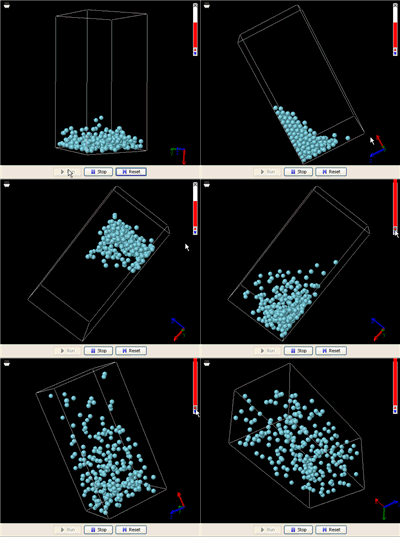
Let's start with a real world example. Imagine a closed glass bottle with some liquid at the bottom. There are a number of things about such a system that most of us have noticed since we were a kid. When we rotate the bottle, the liquid will always flow to fill the lowest part. When the liquid comes to rest, its surface levels off.

Now let's heat it up. As the temperature increases, evaporation accelerates. Eventually, all liquid molecules are evaporated and the liquid vanishes--we end up with a gas that fills the entire bottle. The gas molecules are evenly distributed inside the bottle, no matter how we rotate it. Suppose the bottle is expandable. The gas molecules will fill the entire volume of it, no matter how large it becomes (the gas just gets more diluted).

These are the things we know about the difference between a gas and a liquid from everyday life. Now, let's see how a simple MW simulation can model all these facts. On the right is an animation of a liquid in a box made from an MW simulation (click this link to run it; you will need Java 5.0+). In order for the simulation to run fast enough on an ordinary computer, the liquid includes just 256 molecules. This is not a lot to be called a liquid, but it is enough to demonstrate the phenomena. In addition, a super-strong gravitational field is applied to accelerate the gravitational effect (you might have heard from someone that the gravitational effect is not important at the atomic level, but that is because the gravity on the surface of the Earth is too weak).

A theoretical physicist would celebrate the simulation as the triumph of theoretical physics. The fact that a computational model can describe such a variety of natural phenomena means that they have been deciphered by science.

As an ordinary user, you may not know much about what is under the hood--in fact, most of the time, you should not have to care. You may be wondering what advantages a computer simulation has, compared with just giving students a bottle of water and asking them to flip and boil it. If you are a hands-on person, you may, on the contrary, prefer giving students a bottle of water. So what is the big deal of a simulation for you?

There are a few things that the computer simulation can do for you but a bottle of water cannot. First, the simulation is literally an atomic explanation of what happens when you play with a bottle of water. The very fact that a macroscopic phenomenon can be explained with a picture of a few hundred atoms is a very important insight in science. People have probably known how water in a bottle behaves thousands of years before, but an atomic perspective was not firmly established until 100 years ago.

Second, the simulation provides an "atomic microscope" that allows users to "zoom" into the atomic world easily because we can control it in many ways that are not realizable with a bottle of water. For example, we can navigate an "atomic camera" inside the system, or attach it to an atom. What would it look like if we could be shrunk to an atomic size and take a "space walk" or just "ride on an atom" inside a gas (the image on the right shows a screenshot in which atoms appear to run down to your face)? Kids are motivated by this kind of adventure experience, which can be supported very well by a computer simulation.

Another advantage of a computer simulation is that it can be easily embedded into an electronic textbook (which recently becomes the trend due to budget crises in many states in the US). Obviously, embedding a bottle of water into an electronic textbook is much harder, if not impossible at all (I would never say that is impossible). With the support of this kind of interactive simulation, future textbooks will not be just some readable things. They will be playable delights.

Tuesday, June 2, 2009

Why do educational software need rocket science?

The educational software market is largely dominated by cartoon movies, animations, and games. Developing these media usually requires no rocket science (i.e., sophisticated mathematics and computation in the context of this blog). But this may change soon in the field of science education, enlightened by the success of some applications that will be discussed below.

A strand of mechanical simulation programs started with Interactive Physics back in the 90s and significantly advanced by the recently released Phun and Crayon Physics have demonstrated great educational potential. These impressive programs allow users to draw a variety of shapes, which then move realistically on the screen: they fall, slide, roll, and bump into each other--just like objects in the real world they model do. These programs have a user interface that is very friendly to novices, especially with a freehand drawing tool connected to a digital pen. With only a handful of tools, users can create many interesting simulations. Experienced users can build simulations as sophisticated as a vehicle impact test and a hovercraft takeoff. As a matter of fact, what users can create is limited only by their imagination.

There is no doubt that these tools truly motivate students, unleash their creativity, and make learning physics unprecedentedly enjoyable. But the important thing is that all these would not have been possible without using computational physics. The reason that these tools model the real world so well is because the motions of objects are calculated using Newtonian dynamics--to be more precise, using a computational method commonly known as the multibody dynamics. In fact, Phun uses a computational engine called SPOOK developed by Dr. Claude Lacoursière, and Crayon Physics uses a similar one called Box2D developed by Dr. Erin Catto. These multibody dynamics engines simulate interconnected bodies with contacts, joints, constraints, dry friction, and power input/output. SPOOK even supports multiphysics simulations by integrating the multibody dynamics for modeling rigid bodies with the smoothed particle hydrodynamics for modeling fluids.

The multibody dynamics method comes from rocket science--it is used in industry to model robots, vehicles, and aircraft. It was, however, not intentionally developed for use in education. The generations of computational scientists who developed the method presumably did not anticipate that one day the method would find its use in hundreds of thousands of middle schools and high schools. By the time I was blogging about this, the simulations run in classrooms may have far exceeded those run for research--by any standard.

What does this teach us?

The first lesson we learned is that computational science is not a privilege of some scientists in ivory towers any more. In fact, science education and scientific research share a common goal: to understand how things work. It is, therefore, not surprising that a research tool like the multibody dynamics can be so successfully converted into an effective learning tool. I would further contend that the only correct way to develop an educational tool would be to use the first principles in the corresponding domain of science as much as possible. The initial investment on such a tool may be high (e.g., it needs dedicated computational scientists such as Drs. Lacoursière and Catto, as well as brilliant programmers such as the authors of Phun and Crayon Physics), but the payback will be more powerful, generic software that can last for a long time.

In my opinion, the single most important advantage of using first principles to build an educational tool is that the power of creation and prediction embodied in these scientific principles will be given to students. What else is more important in education than giving students the power developed by the most intelligent individuals of the entire human race in decades or hundreds of years, now that we have a wonderful way of delivering it through computing?

Unfortunately, this advantage is often underappreciated by many educators who do not fully realize the potential of this approach. The vision that the well-advocated cyberinfrastructure should include smart media powered by first principles is not widely shared. Using science to build interactive science media is not part of the design guidelines of mainstream educational media. Applications such as Phun and Crayon Physics are still scarce. There are many more domains of science and engineering that need to be covered.

But there is hope. Outside education, game developers have adopted first principles far earlier. Games need to have realistic look-and-feels in order to be competitive in the market. Major graphics libraries already provide excellent lighting functions. Realistic motion of objects powered by physics engines and projected grid engine for rendering water are now not uncommon in games. Phun and Crayon Physics, despite their great educational power, are billed as games but not educational tools. Perhaps, the breeze from the gaming world into the educational world will slowly transform the way people think of educational media and changes will then occur naturally. What would schools be when they are equipped with tools powered by rocket science?